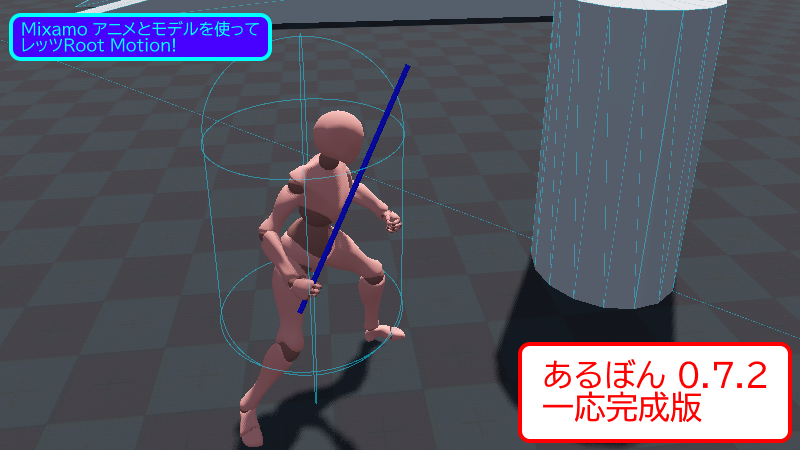
あるぼん(ArBoM)アップデートです。一応完成としますが、完成度は95% と言ったところです。俺にもやっと全方向対応のRoot Bone を付ける事ができた感じです。結構完成まで早くて良かったね。あとはジャンプ・エンドのアニメの腰あたりとか、アイドル時の足滑りとか直したいですが、まー時間があったら対応しようと思います。
1. 「all move」がデフォです
Root Bone を付けるのに「zero move」・「forward-backward move」・「left-right move」・「all move」の4つのモードがありますが、「all move」をデフォルトにしました。基本これで全部イケます。妙な横揺れや前後移動が入って見た目が気に入らない時に、他のモードを試す感じにして下さい。(妙な動きが入ってると酔うよね。)
2. あるぼん(ArBoM)コード
バージョン 0.7.2 公開。一応完成版。暫定的な公開です。問題があれば消します。使う場合は以下の利用規約を守って下さい。
<< 利用規約 >>
- 何が起きても作者は責任を取りません。
- これ自体を販売しないで下さい。
- コピーライトは作者(俺)にあります。
- もっといいやり方があったら逆に(作者に)教えること。
bl_info = {
    "name": "Add Root Bone to Mixamo",
    "author": "honto2kansei",
    "version": (0, 7, 2),
    "blender": (4, 3, 2),
    "category": "Object",
}

import bpy

# ワークスペースをAnimationへ変更
def change_to_animation_workspace():
    for screen in bpy.data.screens:
        if screen.name == "Animation":
            bpy.context.window.workspace = bpy.data.workspaces[screen.name]

# シーン内のすべてのオブジェクトとアクションを削除
def delete_all_objects_and_actions():
    # アクティブオブジェクトがあれば、オブジェクトモードにし、全削除
    if bpy.context.active_object:
        bpy.ops.object.mode_set(mode='OBJECT')
        bpy.ops.object.select_all(action='SELECT')
        bpy.ops.object.delete()

    # アクションの削除
    for action in bpy.data.actions:
        bpy.data.actions.remove(action)

# ルートボーンを入れ1フレにキーを打つ
def add_root_bone(ope):
    # アーマチュアを取得。無ければreturn
    armature = None
    for obj in bpy.data.objects:
        if obj.type == "ARMATURE":
            armature = obj
            break
    if not armature:
        ope.report({"ERROR"}, "No armature found in the scene.")
        return False, None, None, None, None

    # アクションが無ければreturn
    if not bpy.data.actions:
        ope.report({"ERROR"}, "No action found in the scene.")
        return False, None, None, None, None
    action = bpy.data.actions[0]

    # ルートボーン名とヒップボーン名をUIから取得
    root_bone_name = bpy.context.scene.root_bone_name
    hips_bone_name = bpy.context.scene.hips_bone_name

    # アーマチュアを選択しエディットモードに入る
    bpy.context.view_layer.objects.active = armature
    bpy.ops.object.mode_set(mode="EDIT")

    #UIから取得したルートボーン名のボーンがアーマチュア内にすでに有ればreturn
    if root_bone_name in armature.data.edit_bones:
        ope.report({"ERROR"}, f"Bone '{hips_bone_name}' already exists in the armature.")
        return False, None, None, None, None

    #UIから取得したヒップボーン名のボーンがアーマチュア内に無ければreturn
    if hips_bone_name not in armature.data.edit_bones:
        ope.report({"ERROR"}, f"Bone '{hips_bone_name}' not found in the armature.")
        return False, None, None, None, None

    # アーマチュアにルートボーンを追加
    root_bone = armature.data.edit_bones.new(root_bone_name)
    root_bone.head = (0, 0, 0)
    root_bone.tail = (0, 30, 0)

    # ルートボーンをヒップボーンの親にする
    hips_bone = armature.data.edit_bones[hips_bone_name]
    hips_bone.parent = root_bone

    # アクションにグループを追加
    if root_bone_name not in action.groups:
        new_group = action.groups.new(name=root_bone_name)

    # ポーズモードにし、ルートボーンの位置を(0,0,0)に指定
    bpy.ops.object.mode_set(mode="POSE")
    armature.pose.bones[root_bone_name].location = (0, 0, 0)

    # アクションを指定
    armature.animation_data.action = action

    # 位置情報をキーフレームとして1フレーム目に追加
    armature.pose.bones[root_bone_name].keyframe_insert(data_path="location", frame=1, group=new_group.name)

    return True, armature, action, root_bone_name, hips_bone_name

# ルートボーンとヒップボーンを移動(前後移動用)
def change_root_hip_z_pos(armature, action, root_bone_name, hips_bone_name, ope):
    # ヒップボーンのアクショングループ確認
    if hips_bone_name not in action.groups:
        ope.report({"ERROR"}, f"Group '{hips_bone_name}' not found in the action.")
        return False

    # タイムラインのプレイヘッドを1フレーム目に移動
    bpy.context.scene.frame_set(1)

    # 1フレーム目のヒップボーンのZ位置を取得
    initial_hips_z_pos = armature.pose.bones[hips_bone_name].location.z

    # アクションのフレームを取得し「2」フレーム目から「最終」フレームまでまわす(+1は必須!)
    frame_range = range(2, int(action.frame_range[1]) + 1)
    for frame in frame_range:
        # タイムラインのプレイヘッドを移動
        bpy.context.scene.frame_set(frame)
        # 指定フレームのヒップボーンの位置を取得
        original_hips_pos = armature.pose.bones[hips_bone_name].location

        # ルートボーンの位置情報キーフレームを打つ(zのみ,xyは0のまま)
        root_bone = armature.pose.bones[root_bone_name]
        root_bone.location.z = original_hips_pos.z - initial_hips_z_pos
        root_bone.keyframe_insert(data_path="location", frame=frame, group=action.groups[root_bone_name].name)

        # ヒップボーンの位置情報キーフレームを打つ(zをinitial_hips_z_pos、xはオリジナル情報を残す、yはfix)
        hips_bone = armature.pose.bones[hips_bone_name]
        fix_y = original_hips_pos.z * float(bpy.context.scene.y_fix_value)
        hips_bone.location = (original_hips_pos.x, original_hips_pos.y - fix_y, initial_hips_z_pos)
        hips_bone.keyframe_insert(data_path="location", frame=frame, group=action.groups[hips_bone_name].name)

    return True

# ルートボーンとヒップボーンを移動(左右移動用)
def change_root_hip_x_pos(armature, action, root_bone_name, hips_bone_name, ope):
    # ヒップボーンのアクショングループ確認
    if hips_bone_name not in action.groups:
        ope.report({"ERROR"}, f"Group '{hips_bone_name}' not found in the action.")
        return False

    # タイムラインのプレイヘッドを1フレーム目に移動
    bpy.context.scene.frame_set(1)

    # 1フレーム目のヒップボーンのx位置を取得
    initial_hips_x_pos = armature.pose.bones[hips_bone_name].location.x

    # アクションのフレームを取得し「2」フレーム目から「最終」フレームまでまわす(+1は必須!)
    frame_range = range(2, int(action.frame_range[1]) + 1)
    for frame in frame_range:
        # タイムラインのプレイヘッドを移動
        bpy.context.scene.frame_set(frame)
        # 指定フレームのヒップボーンの位置を取得
        original_hips_pos = armature.pose.bones[hips_bone_name].location

        # ルートボーンの位置情報キーフレームを打つ(xのみ,zyは0のまま)
        root_bone = armature.pose.bones[root_bone_name]
        root_bone.location.x = original_hips_pos.x - initial_hips_x_pos
        root_bone.keyframe_insert(data_path="location", frame=frame, group=action.groups[root_bone_name].name)

        # ヒップボーンの位置情報キーフレームを打つ(xをinitial_hips_x_pos、zyはオリジナル情報を残す)
        hips_bone = armature.pose.bones[hips_bone_name]
        hips_bone.location = (initial_hips_x_pos, original_hips_pos.y, original_hips_pos.z)
        hips_bone.keyframe_insert(data_path="location", frame=frame, group=action.groups[hips_bone_name].name)

    return True

# ルートボーンとヒップボーンを移動(前後左右移動用)
def change_root_hip_xz_pos(armature, action, root_bone_name, hips_bone_name, ope):
    # ヒップボーンのアクショングループ確認
    if hips_bone_name not in action.groups:
        ope.report({"ERROR"}, f"Group '{hips_bone_name}' not found in the action.")
        return False

    # タイムラインのプレイヘッドを1フレーム目に移動
    bpy.context.scene.frame_set(1)

    # 1フレーム目のヒップボーンのx,z位置を取得
    initial_hips_x_pos = armature.pose.bones[hips_bone_name].location.x
    initial_hips_z_pos = armature.pose.bones[hips_bone_name].location.z

    # アクションのフレームを取得し「2」フレーム目から「最終」フレームまでまわす(+1は必須!)
    frame_range = range(2, int(action.frame_range[1]) + 1)
    for frame in frame_range:
        # タイムラインのプレイヘッドを移動
        bpy.context.scene.frame_set(frame)
        # 指定フレームのヒップボーンの位置を取得
        original_hips_pos = armature.pose.bones[hips_bone_name].location

        # ルートボーンの位置情報キーフレームを打つ(x,zを変える、yは0のまま)
        root_bone = armature.pose.bones[root_bone_name]
        root_bone.location.x = original_hips_pos.x - initial_hips_x_pos
        root_bone.location.z = original_hips_pos.z - initial_hips_z_pos
        root_bone.keyframe_insert(data_path="location", frame=frame, group=action.groups[root_bone_name].name)

        # ヒップボーンの位置情報キーフレームを打つ(x,zをinitial_~、yはfix)
        hips_bone = armature.pose.bones[hips_bone_name]
        fix_y = original_hips_pos.z * float(bpy.context.scene.y_fix_value)
        hips_bone.location = (initial_hips_x_pos, original_hips_pos.y - fix_y, initial_hips_z_pos)
        hips_bone.keyframe_insert(data_path="location", frame=frame, group=action.groups[hips_bone_name].name)

    return True

# ドロップダウンメニュー「zero move」の処理
# add_root_bone()
# change_to_animation_workspace()
def add_root_bone_zero(ope):
    result, armature, action, root_bone_name, hips_bone_name = add_root_bone(ope)
    if result == False:
        return
    change_to_animation_workspace()

# ドロップダウンメニュー「forward-backward move」の処理
# add_root_bone()
# change_root_hip_z_pos()
# change_to_animation_workspace()
def add_root_bone_fb(ope):
    result, armature, action, root_bone_name, hips_bone_name = add_root_bone(ope)
    if result == False:
        return
    result = change_root_hip_z_pos(armature, action, root_bone_name, hips_bone_name, ope)
    if result == False:
        return
    change_to_animation_workspace()

# ドロップダウンメニュー「left-right move」の処理
# add_root_bone()
# change_root_hip_x_pos()
# change_to_animation_workspace()
def add_root_bone_lr(ope):
    result, armature, action, root_bone_name, hips_bone_name = add_root_bone(ope)
    if result == False:
        return
    result = change_root_hip_x_pos(armature, action, root_bone_name, hips_bone_name, ope)
    if result == False:
        return
    change_to_animation_workspace()

# ドロップダウンメニュー「all move」の処理
# add_root_bone()
# change_root_hip_xz_pos()
# change_to_animation_workspace()
def add_root_bone_all(ope):
    result, armature, action, root_bone_name, hips_bone_name = add_root_bone(ope)
    if result == False:
        return
    result = change_root_hip_xz_pos(armature, action, root_bone_name, hips_bone_name, ope)
    if result == False:
        return
    change_to_animation_workspace()

# オペレータークラス(Add Root Bone)
class AddRootBoneOperator(bpy.types.Operator):
    bl_idname = "object.add_root_bone"
    bl_label = "Add Root Bone"
    bl_description = "Add root bone to action"

    def execute(self, context):
        match context.scene.bone_animation_enum:
            case "ZERO":
                add_root_bone_zero(self)
            case "FB":
                add_root_bone_fb(self)
            case "LR":
                add_root_bone_lr(self)
            case "ALL":
                add_root_bone_all(self)
            case _:
                self.report({"ERROR"}, "Unknown animation type selected.")
        return {"FINISHED"}

# オペレータークラス(Delete All)
class DeleteAllOperator(bpy.types.Operator):
    bl_idname = "object.delete_all"
    bl_label = "Delete All"
    bl_description = "Delete all object and action"

    def execute(self, context):
        delete_all_objects_and_actions()
        return {'FINISHED'}

# パネルクラス
class AddRootBonePanel(bpy.types.Panel):
    bl_idname = "VIEW3D_PT_add_root_bone"
    bl_label = "Add Root Bone to Mixamo"
    bl_space_type = "VIEW_3D"
    bl_region_type = "UI"
    bl_category = "ArBoM"

    def draw(self, context):
        layout = self.layout
        row = layout.row()
        row.prop(context.scene, "hips_bone_name")
        row = layout.row()
        row.prop(context.scene, "root_bone_name")
        row = layout.row()
        row.prop(context.scene, "bone_animation_enum")
        if context.scene.bone_animation_enum == "FB" or context.scene.bone_animation_enum == "ALL":
            row = layout.row()
            row.prop(context.scene, "y_fix_value")
        layout.operator(AddRootBoneOperator.bl_idname)
        layout.separator()
        layout.operator(DeleteAllOperator.bl_idname)

def register():
    bpy.utils.register_class(AddRootBoneOperator)
    bpy.utils.register_class(AddRootBonePanel)
    bpy.utils.register_class(DeleteAllOperator)
    bpy.types.Scene.hips_bone_name = bpy.props.StringProperty(name="Hips", default="mixamorig:Hips")
    bpy.types.Scene.root_bone_name = bpy.props.StringProperty(name="Root", default="Root")
    bpy.types.Scene.y_fix_value = bpy.props.StringProperty(name="Y fix", default="0.0129317")
    bpy.types.Scene.bone_animation_enum = bpy.props.EnumProperty(
        name="Type",
        items=[
            ("ZERO", "zero move", ""),
            ("FB", "forward-backward move", ""),
            ("LR", "left-right move", ""),
            ("ALL", "all move", "")
        ],
        default="ALL"
    )

def unregister():
    bpy.utils.unregister_class(AddRootBoneOperator)
    bpy.utils.unregister_class(AddRootBonePanel)
    bpy.utils.unregister_class(DeleteAllOperator)
    del bpy.types.Scene.hips_bone_name
    del bpy.types.Scene.root_bone_name
    del bpy.types.Scene.y_fix_value
    del bpy.types.Scene.bone_animation_enum

if __name__ == "__main__":
    register()
3. 「あるぼん」の使い方
使用方法は変わっていません。以前の記事を参考に。


